
Looking for the best note-taking free app for students in 2026? Here are 5 real picks, tested for Android, PDFs, and exam season.
Let’s be honest: most “best apps” articles are written by people who only check a few websites. They read the app’s homepage and call it research.Not so in this case.
I’ve spent more than ten years working on technology and productivity for students. During this time, I’ve seen the competition among the best note-taking free apps change every year. And 2026 is the year when we’re seeing something new. This year, note-taking apps are doing more than just helping you type notes. They now help you find and review your notes before exams.
I have put these apps through their paces by using them exactly as a student would. That is, with chaotic lecture notes, hurriedly uploaded PDFs, team project madness. So here are the survivors.
Why Your Note-Taking App Actually Matters
Before we get into the list, here’s something most blogs skip: the app you pick shapes how you study, not just where you write things down.
- A cluttered app means you spend more time organizing than learning
- A slow app on Android makes you abandon note-taking mid-class
- An app with no PDF support leaves your readings scattered
- An app that isn’t free just adds one more subscription to a student budget
That’s exactly why this list focuses on tools that are genuinely useful and free.
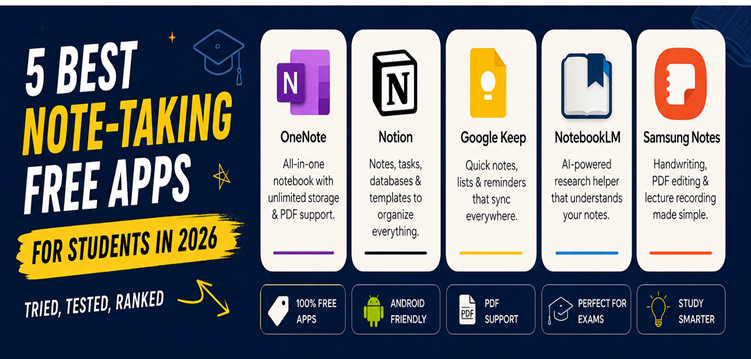
1. Microsoft OneNote
OneNote was released in 2003. And to be honest, that is the reason why people do not realize its worth. OneNote looks old tech. OneNote works on all major platforms and supports handwriting with a stylus. You can also add PDFs to your notes, sync everything automatically, and use AI Copilot, all for free.
Why it’s great for students:
- Unlimited notebooks and storage without any restrictions for the free plan
- Same functionality across any device – laptop, iPad, or smartphone
- Search handwriting – write down notes anywhere and be able to find them later
- No hassles signing up as long as your college is using Microsoft 365
If you want one dependable home for every subject, this is it.
2. Notion
Notion is one of the best note-taking free app and this is not hard to understand. This just not offer notes, but notes, to-do lists, class schedules, and databases all in one space. This program lets you create notes, to-do lists, study schedules, and databases in one place. You can organize everything by subject, semester, or topic and find what you need quickly. Yes, in the first week, this may be somewhat confusing. By the third week, you will find it impossible to return to plain old notes.
Why students stick with it:
- GPA trackers, semester plans, and revision schedules in free templates
- Integrated AI that can analyze long notes and make complicated texts easier to understand
- Perfect for group work because pages are easily shareable
- One of the best note-taking free app for students who uses Android and desktop
If organization is your weak spot, Notion basically becomes your second brain.
3. Google Keep
Every note doesn’t have to use folders. Sometimes you just want to scribble down something in the interclass interval before it slips from your mind: a formula, a deadline, a reading list. In that case, Google Keep is a winner.
It loads in an instant, gets synced the moment you’re back on the network, and doesn’t require learning anything new. The colored labels help you organize your notes by subject. Voice notes are also useful when you’re leaving a lecture with your hands full of books.
Why it works for busy students:
- Instant sync across Android, iPhone, and desktop
- Checklists that are perfect for assignment tracking
- Reminders tied to time or location (useful for library due dates)
- Zero learning curve, which matters when you’re juggling five subjects
It’s not built for long essays or research, but as a quick-capture student note taking app free of complexity, nothing beats it.
4. NotebookLM
This deserves more coverage than it gets. NotebookLM is Google’s AI-powered research notebook. It is free for individual users and does not have paid tiers or usage limits. You can upload your readings, slides, and lecture materials to NotebookLM. It then creates an AI tutor that uses only the information you provide and does not add unrelated information.
Why it’s worth adding to your toolkit:
- Upload PDFs, Google Docs, YouTube lecture links, or entire textbooks
- Ask questions and get answers cited straight from your own material
- Auto-generated mind maps that show how ideas across chapters connect
- Perfect companion tool alongside OneNote or Notion, not a replacement for them
Use it right before an exam and you’ll wonder how you survived without it.
5. Samsung Notes
For people with an Android phone or tablet, don’t overlook the app that’s already available on your device. Samsung Notes supports handwritten notes, PDF editing, and dictation without any popups asking for subscriptions.
It is the best undervalued and best note-taking free app for Android users only due to the reason that it is designed keeping in mind the S Pen’s functionality.
Why it deserves a spot on this list:
- Completely free with no premium tier blocking core features
- Excellent handwriting recognition, ideal for math and diagram-heavy subjects
- Records lectures while you write, then syncs both together
- Syncs seamlessly with Samsung Notes on web for laptop review
For Android and Galaxy Tab students specifically, this is the closest thing to a free GoodNotes alternative.
How to Actually Pick One (Instead of Downloading All Five)
Here’s the part most lists never tell you stacking five apps is worse than using none well. Pick based on how you actually study:
- Want one home for everything? Go with OneNote.
- Like planners, templates, and structure? Go with Notion.
- Need something fast for quick capture? Go with Google Keep.
- Drowning in readings and PDFs? Add NotebookLM alongside whichever app you pick.
- On a Galaxy device with an S Pen? Samsung Notes is sitting right there, unused.
Most students do best combining just two of these, one for daily notes, one for AI-assisted revision, rather than juggling all five at once.
Final Thoughts
What are the best note-taking free apps? It is not the one that has more functions than you could possibly think of – it is the one that you will open first thing at 9 AM before a class and again late at night before a test. Use OneNote and Notion for your regular notes. When you have lots of study materials, use NotebookLM, and if you have an Android phone, try Samsung Notes and Google Keep before paying for premium features.